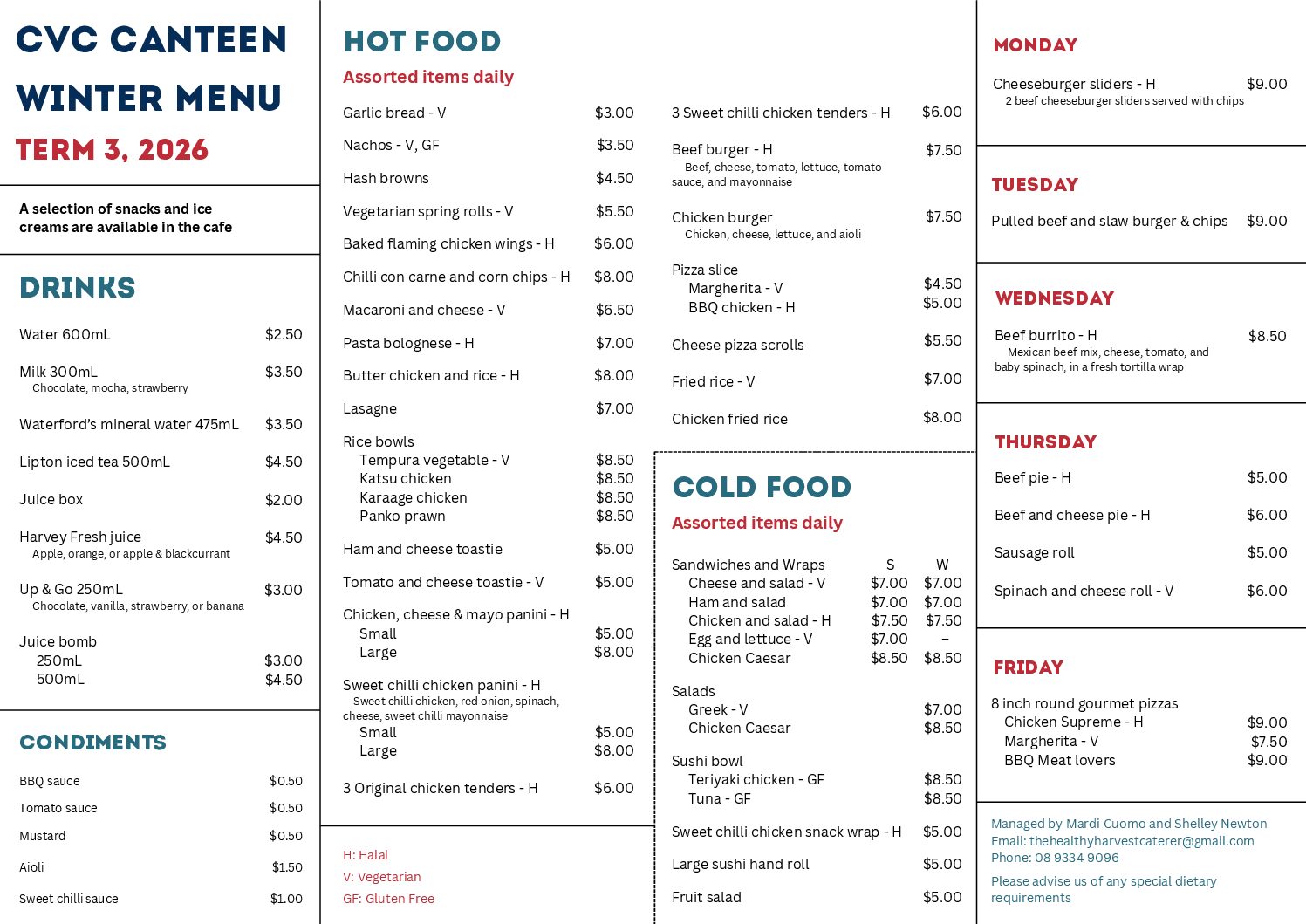
CVC Cafe

The CVC Canteen utilises QuickCliq’s online ordering system. Cash and Eftpos are also available onsite.
Please note: The Canteen menu is subject to change depending on availability. Please view the QuickCliq menu when ordering for the most up-to-date version.
Accounts can be registered for free via https://app.quickcliq.com.au/sign-up.aspx
Parents need to select REGISTER, and complete the online registration form. Once complete you will receive an account activation email. When the account is active parents can login to their account via
https://app.quickcliq.com.au/
Once logged in parents can add children to their account by selecting STUDENT. You will be prompted to add the child’s name, school, year etc. You can also add Health Warning notes and create student logins if required.
Parents/Staff have the options of either adding funds to their account in advance or pay for each order individually (PAYG). Payment methods include:
• Visa/MasterCard/Amex
• PayPal
• Direct Debit (single payment only + only available via ADD CREDIT)
Various surcharges apply, with all details outlined in the user account.